WhatsApp Appointment Booking Automation: Automate Bookings and Save Business Time
Many businesses use WhatsApp to communicate with customers.
Customers ask questions.
They request prices.
They check availability.
And very often, they want to book an appointment.
For many businesses, appointment booking still depends on manual WhatsApp conversations.
A customer sends a message.
A staff member replies.
The customer asks about available times.
The staff member checks the schedule.
The customer changes the preferred time.
Several messages later, the appointment is finally confirmed.
This process can take a lot of time.
It can also create unnecessary back-and-forth communication.
This is where WhatsApp Appointment Booking Automation can help.
By using WhatsApp automation and AI, businesses can create a more structured booking conversation and help customers move from enquiry to appointment more efficiently.
What Is WhatsApp Appointment Booking Automation?
WhatsApp Appointment Booking Automation is a system that helps businesses manage appointment conversations through WhatsApp.
Instead of requiring staff to manually handle every booking message, automation can assist with the booking process.
A customer may send:
"Hi, I want to book an appointment."
The automated WhatsApp workflow can then guide the customer.
It may ask:
"What service would you like to book?"
The customer selects or replies with the service.
The workflow can continue by asking for the preferred date and time.
The business can then manage the next step based on its own appointment process.
The goal is simple.
Make appointment conversations easier to manage.
Why Businesses Need WhatsApp Appointment Booking Automation
Appointment booking can become repetitive.
Many businesses receive similar messages every day.
"Can I book?"
"Are you available tomorrow?"
"What time do you have?"
"Can I change my appointment?"
"Can I cancel my booking?"
When staff handle every conversation manually, the business spends a lot of time on repetitive communication.
WhatsApp Appointment Booking Automation can help reduce this manual workload.
It can help businesses create a more consistent booking process.
Customers Already Want to Book Through WhatsApp
Customers prefer convenient communication.
Many people do not want to:
- Call a business
- Wait on hold
- Fill in a long form
- Download another application
They simply want to send a WhatsApp message.
For a business, this creates an opportunity.
Instead of sending a customer to a completely different booking experience, the business can start the appointment conversation directly on WhatsApp.
This creates a familiar customer journey.
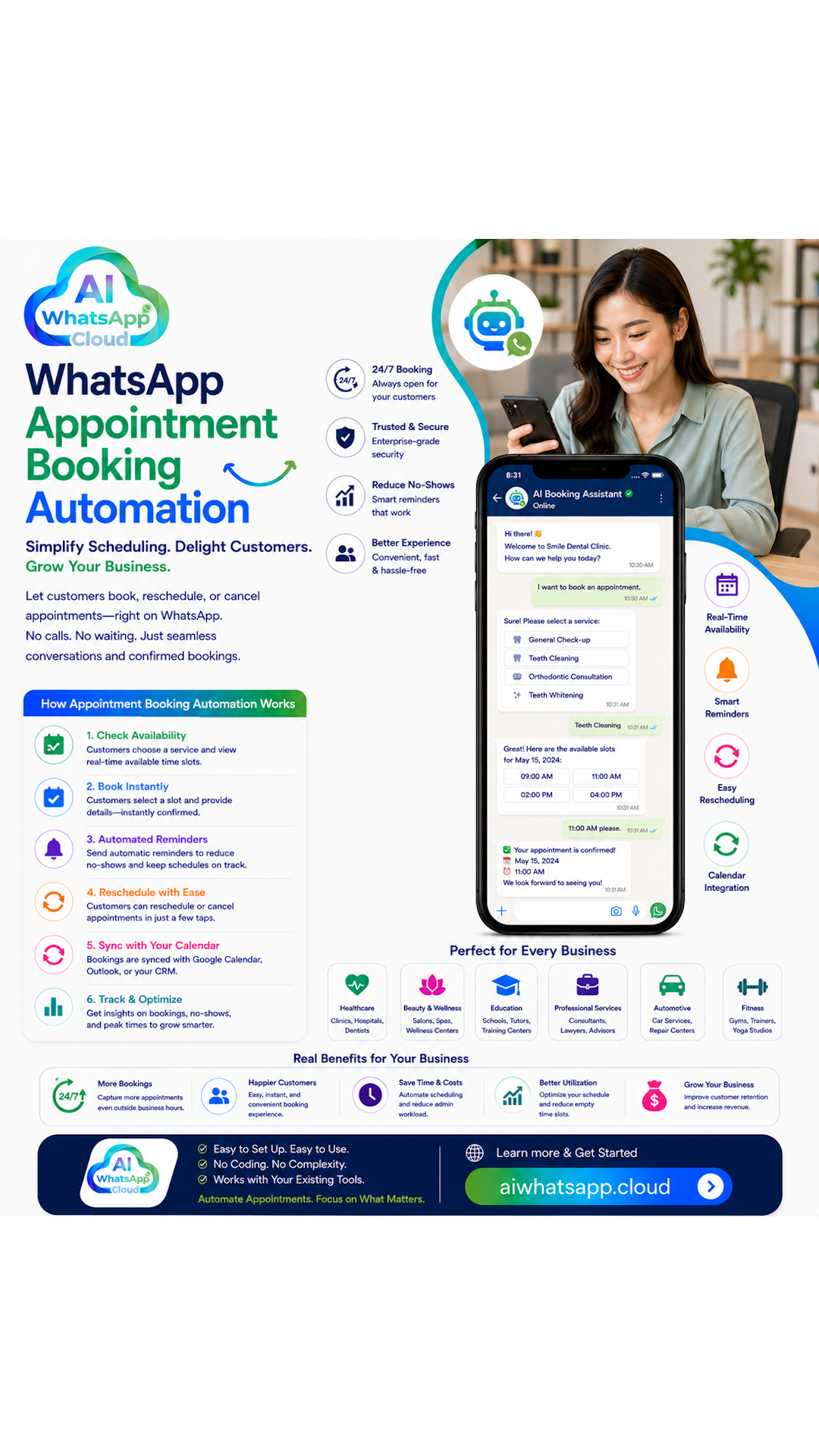
How WhatsApp Appointment Booking Automation Works
A typical automated booking workflow may look like this.
Step 1: Customer Sends a WhatsApp Message
The customer starts a conversation.
For example:
"Hi, I want to book a consultation."
The system identifies that the customer is interested in making an appointment.
Step 2: The Customer Selects a Service
The workflow asks the customer what they need.
For example:
- Consultation
- Treatment
- Facial
- Hair service
- Property viewing
The available options depend on the business.
Step 3: The Customer Provides a Preferred Date
The customer can share a preferred date.
For example:
"Saturday."
The AI or automation workflow can continue the conversation.
Step 4: The Customer Selects a Preferred Time
The customer can provide a preferred time.
For example:
"Around 2pm."
The business can then check or manage the availability according to its booking workflow.
Step 5: The Appointment Conversation Continues
The system can collect the required information.
This may include:
- Customer name
- Selected service
- Preferred date
- Preferred time
- Contact details
Step 6: The Booking Is Confirmed
Once the appointment is confirmed, the customer can receive a WhatsApp confirmation message.
The conversation remains in the same communication channel.
AI WhatsApp Appointment Booking Is More Natural
Traditional chatbot flows often depend on buttons and fixed keywords.
For example:
"Reply 1 for booking."
"Reply 2 for pricing."
This can work.
However, customers do not always follow a fixed format.
A customer may write:
"Hi, can I come in next Tuesday afternoon for a consultation?"
An AI WhatsApp system can help understand the customer's intent.
The customer can communicate more naturally.
This creates a better conversation experience.
WhatsApp Appointment Booking Automation for Dental Clinics
Dental clinics receive many appointment enquiries through WhatsApp.
A patient may ask:
"Can I book a dental check-up?"
The automated workflow can help identify the service the patient is interested in.
It can collect the preferred date and time.
It can also answer common questions about the clinic according to the business's approved information.
When the conversation requires human attention, the clinic team can take over.
This can help reduce repetitive appointment messages for the clinic staff.
WhatsApp Appointment Booking Automation for Beauty Salons
Beauty salons are another common use case.
Customers may ask:
"Do you have an opening for a facial this weekend?"
Or:
"Can I book a hair appointment tomorrow?"
A WhatsApp booking automation workflow can help guide the conversation.
The customer can ask about services.
The business can collect booking details.
The team can manage confirmed appointments more efficiently.
For busy salons, reducing manual booking conversations can save valuable staff time.
WhatsApp Appointment Booking Automation for Consultants
Consultants often receive enquiries through WhatsApp.
A potential client may want to schedule an initial consultation.
The WhatsApp workflow can help collect basic information before the consultation.
For example:
- What service is required?
- What is the main requirement?
- When is the customer available?
The consultant can then receive more context before speaking with the customer.
This can improve the appointment preparation process.
WhatsApp Appointment Booking Automation for Real Estate
Real estate agents often receive messages from potential buyers and tenants.
A customer may write:
"I want to view this property."
The WhatsApp automation workflow can help collect the customer's preferred viewing time.
It can also ask relevant qualifying questions.
For example:
- Are you buying or renting?
- What type of property are you looking for?
- What is your preferred location?
The agent can then focus on the most relevant property enquiries.
WhatsApp Appointment Booking Automation for Pet Services
Pet grooming businesses, pet hotels and pet service providers also manage many bookings.
A customer may ask:
"Can I book grooming for my dog this weekend?"
The WhatsApp booking conversation can collect the service requirement and preferred appointment details.
The business can then continue with its booking workflow.
This is especially useful for businesses that receive many WhatsApp enquiries every day.
Automated Appointment Reminders on WhatsApp
Booking the appointment is only one part of the process.
Businesses also need to communicate with customers before the appointment.
Appointment reminders can help businesses keep customers informed.
A reminder may include:
- Appointment date
- Appointment time
- Service details
- Business location
The exact reminder workflow depends on the business.
The important point is that WhatsApp can remain part of the customer communication process.
WhatsApp Automation for Rescheduling Appointments
Customers sometimes need to change their appointment.
They may send:
"Can I move my appointment to Friday?"
Without automation, staff need to manually handle the conversation.
A structured WhatsApp appointment workflow can help identify the rescheduling request.
The customer can then be guided through the next step.
This creates a more organised process for both the customer and the business.
WhatsApp Appointment Booking Automation for Cancellations
Appointment cancellations are also common.
A customer may write:
"I need to cancel my appointment."
The business can define how cancellation requests should be handled.
The automated workflow can help identify the request and guide the customer.
If human approval is required, the conversation can be handed over to the business team.
AI WhatsApp Appointment Booking with Human Handover
Automation should not mean that customers are unable to speak with a human.
Some conversations require human assistance.
For example:
- Complex booking requests
- Special customer requirements
- Complaints
- Custom pricing
- Unusual scheduling requests
A good WhatsApp automation strategy should allow human handover.
The AI can help with the initial conversation.
The human team can take over when necessary.
This creates a balance between automation and personal customer service.
WhatsApp Appointment Booking Automation Reduces Repetitive Work
One of the biggest benefits of WhatsApp Appointment Booking Automation is reducing repetitive work.
Staff do not need to manually type the same booking questions every day.
They do not need to repeatedly explain the same appointment process.
They can spend more time on customers and business operations.
The automation handles the repetitive communication.
The team focuses on higher-value work.
Why WhatsApp Appointment Booking Is Better Than a Long Booking Form
A booking form can be useful.
However, some customers may not want to fill in a long form.
They may prefer to simply send a WhatsApp message.
A conversational booking process can feel more natural.
The customer can ask questions during the process.
The business can provide information when required.
This creates a more flexible appointment journey.
How to Start WhatsApp Appointment Booking Automation
Businesses do not need to automate every booking process immediately.
A good starting point is to review existing WhatsApp conversations.
Look for common messages such as:
"Can I book?"
"What time is available?"
"Can I change my appointment?"
"Where is your location?"
These repetitive conversations can become the starting point for automation.
The business can then build a WhatsApp workflow around its most common booking requests.
Common Mistakes Businesses Make with WhatsApp Booking Automation
Automating Everything at Once
A business does not need to automate every process on day one.
Start with one clear appointment workflow.
Creating a Complicated Conversation
Customers want to book easily.
Too many questions can create unnecessary friction.
Ignoring Human Handover
Some customers need a human team member.
A good workflow should make human handover simple.
Using Generic Information
The automation should be based on the actual business.
Services, booking rules and customer questions should be relevant to the business.
The Future of WhatsApp Appointment Booking Automation
Appointment booking is becoming more conversational.
Customers want to communicate with businesses in a simple and familiar way.
They want fast answers.
They want convenient booking.
They want fewer unnecessary steps.
AI WhatsApp automation can help businesses create a more intelligent appointment communication process.
The future is not simply about sending automatic replies.
It is about understanding the customer's intent and helping move the conversation forward.
Final Thoughts
WhatsApp Appointment Booking Automation can help businesses reduce repetitive booking conversations and create a more efficient customer communication workflow.
From dental clinics and beauty salons to consultants, real estate agents and pet service businesses, many companies can benefit from structured WhatsApp appointment automation.
The goal is not to remove the human team.
The goal is to let automation handle repetitive conversations while staff focus on customers that need personal attention.
If your business is still manually managing every appointment enquiry on WhatsApp, visit AIWhatsApp.Cloud to explore how AI WhatsApp automation can help you build a smarter appointment booking workflow.